Summary
This Article explains how to quickly set a staff member as unavailable for a Parent Teacher Interview (PTI) Session
End Result
Staff member will be marked as Unavailable and unable to be booked for an interview by a Parent
Method
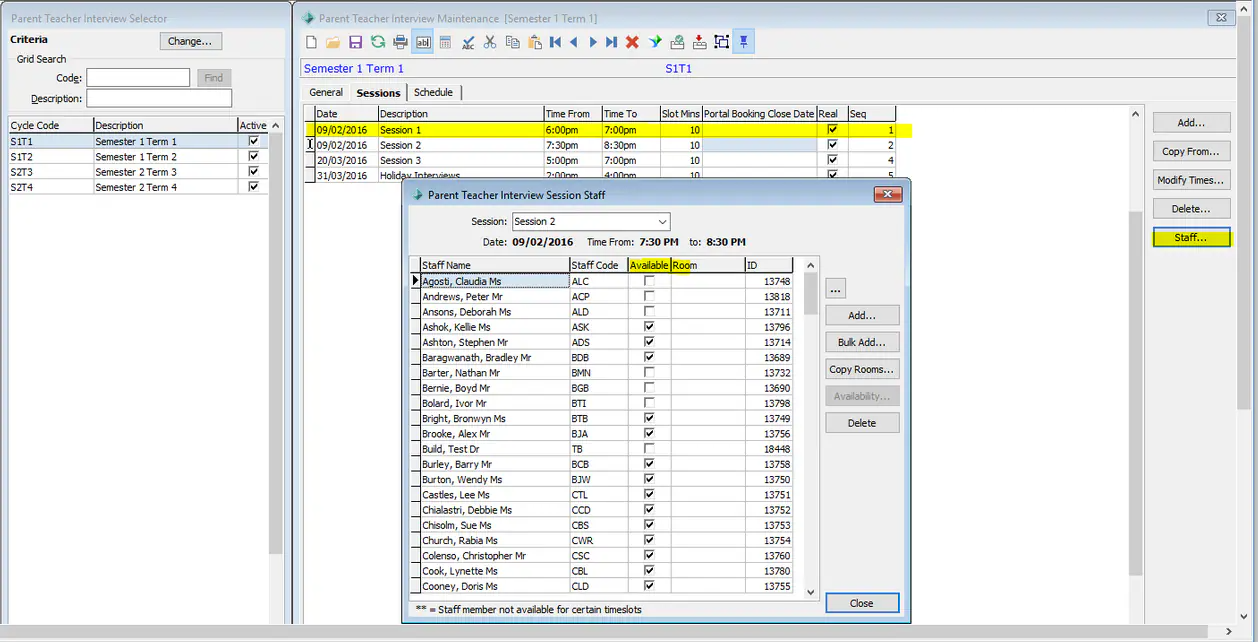
- Go to Students > Parent Teach Interview Maintenance
- Click on the 'Sessions' Tab
- Click on the Staff button on the right hand side.
- Using the "Available" flag can un tick to indicate that the Staff member is not available
If you have a time where All staff will be unavailable, create a session for that specific time frame click down the list rather than editing each staff member individually via the schedule tab.
Was this article helpful?
That’s Great!
Thank you for your feedback
Sorry! We couldn't be helpful
Thank you for your feedback
Feedback sent
We appreciate your effort and will try to fix the article