TABLE OF CONTENTS
This TaxRates.txt contains Australian FY26 ATO and New Zealand FY25 NZ IRD Tax Rates.
Downloading the tax rates file
To download the TaxRates.txt file, right-click the link TaxRates.txt file (AU - Payroll Tax Tables 2025/26) or the image below and select 'Save As'. Alternatively, you can download the TaxRates.txt file directly from the attachment below.
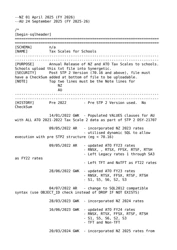
Save the file to your preferred file directory.

Loading the tax rates
After downloading the tax rates file, the new rates can be loaded into Synergetic.
To load the tax rates into Synergetic:
Select Module > Payroll > Load Tax Rates.
The Load Payroll Tax Rates window is displayed.Click
Navigate to the file directory where you saved the TaxRates.txt file.
Select the file.
Click
The file path is loaded into the Load from Directory field.Check the file path is correct.
Click
The Confirm window is displayed.Confirm that the File is: Dated 24 September 2025 (FY 2025-26).
Click
.
The tax rates will load and Synergetic will be updated with the new figures ready to use in your first post September 24, 2025 pay.


.png?version=1&modificationDate=1750307844641&cacheVersion=1&api=v2)

.png?version=1&modificationDate=1750307844641&cacheVersion=1&api=v2)


Questions?
If you have any questions regarding the above information, please create a Service Desk ticket.
Synergetic help and support portal


Was this article helpful?
That’s Great!
Thank you for your feedback
Sorry! We couldn't be helpful
Thank you for your feedback
Feedback sent
We appreciate your effort and will try to fix the article