Synweb Staff Kiosk has the capability to email a notification to a recipient advising a staff member has updated their Personal Details(Staff Kiosk-> MyDetails -> Edit Personal Details).
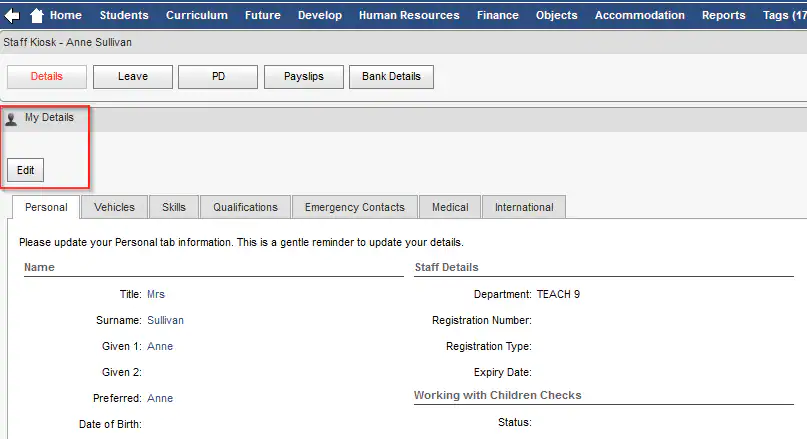
This help page covers troubleshooting emails not being generated or received originating from a Personal Details update request raised in HR Staff Kiosk.
1 - Configuration File maintenance UpdateMode
In Synergetic Windows (Synmain) Main select System -> Configuration File Maintenance
Key1 = SynWeb
Key2 = StaffKiosk
Key3 = MyDetails
Key4 = UpdateMode
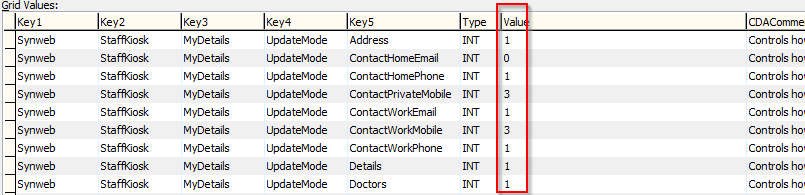
Staff kiosk has 3 update modes
0 - ReadOnly
1 - Updates directly (no approval required)
3 - Update approval via Email
Only Update Mode records with Value = 3 will generate an Email to be actioned
2 - Configuration File Maintenance Email Settings
Filter on :
Key1 = SynWeb
Key2 = StaffKiosk
Key3 = MyDetails
Key4 = Email
Check/Confirm the following configuration settings
ApproverAddress : The Email recipient (Approver)
Importance : Low, Normal, High
Intro : Email body content with merge fields
Subject : Email Subject with merge fields

3 - Configuration File Maintenance Email Server Settings
MyDetails Email notifications uses the standard Synweb Server settings
Filter on :
Key1 = SynWeb
Key2 = Email
Ensure the SynWeb Email Server settings match your Exchange server settings

4 - Approval/Update of Staff MyDetails Changes
Any Staff Kiosk change with update mode = 3 will generate an email to the Approver Address in Step 2.
In Synweb or SynMain the approver will then navigate to Staff Maintenance or Community Maintenance and action the necessary updates.
Ensure the Email and Subject content contains all necessary replaceable fields to identify the requestor
Was this article helpful?
That’s Great!
Thank you for your feedback
Sorry! We couldn't be helpful
Thank you for your feedback
Feedback sent
We appreciate your effort and will try to fix the article